YouTube Deep Search

YouTube Deep Search

Deep Search is a self-initiated case study exploring an AI-powered contextual search experience for YouTube. The concept investigates how natural language, visual cues, and remembered moments could surface precise video segments rather than entire titles. By integrating Gemini-powered reasoning into YouTube’s existing ecosystem, this project reimagines search as an exploratory and conversational workflow that helps users find exactly what they mean, not just what they type.

Client

Self-initiated concept for YouTube

DELIVERABLES

• FEATURE CONCEPT & UX STRATEGY • INTERACTION FLOWS & UI DESIGN • MOTION PROTOTYPE & TEASER • CASE STUDY DOCUMENTATION

Year

2026

Role

Product Designer - Concept, UX, interaction, motion, and case study narrative
🔀

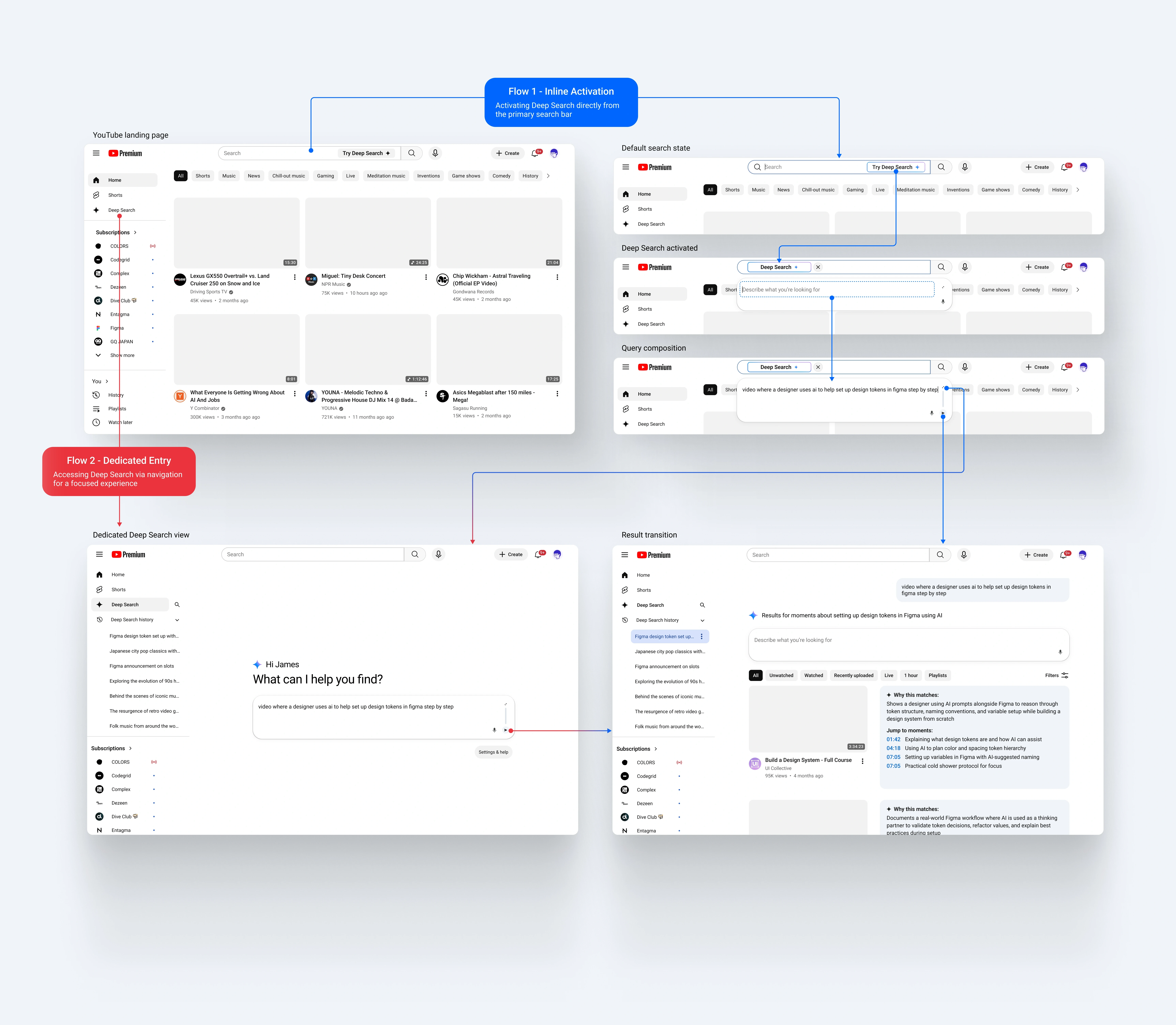
Deep Search Entry Paths

Deep Search can be activated through two distinct entry paths. Users can launch it inline from the primary search bar for quick exploration, or enter through a dedicated navigation route for a more focused semantic search experience.

🔀

Deep Search Entry Paths

Deep Search can be activated through two distinct entry paths. Users can launch it inline from the primary search bar for quick exploration, or enter through a dedicated navigation route for a more focused semantic search experience.

Rediscovering watched content

Pain Point

You remember watching the video but cannot find it again through history search.

Why search fails

Traditional search depends on titles and metadata, not the concepts or phrasing you remember.

Deep Search solution

Deep Search retrieves watched videos using spoken context and thematic similarity, helping you rediscover moments even when memory and metadata do not align.
I know this video should be in my history but I can’t find it. The guy talked about training in an 85% heart rate zone for running. Can you help me track it down?

I know this video should be in my history but I can’t find it. The guy talked about training in an 85% heart rate zone for running. Can you help me track it down?

there was a figma tutorial where someone explained variable naming with color scales. I think I watched it last week

there was a figma tutorial where someone explained variable naming with color scales. I think I watched it last week

a podcast clip where they talked about cold exposure and dopamine but I don’t remember the episode

a podcast clip where they talked about cold exposure and dopamine but I don’t remember the episode

video where a guy compares two running shoes and shows slow motion footage of heel striking

video where a guy compares two running shoes and shows slow motion footage of heel striking

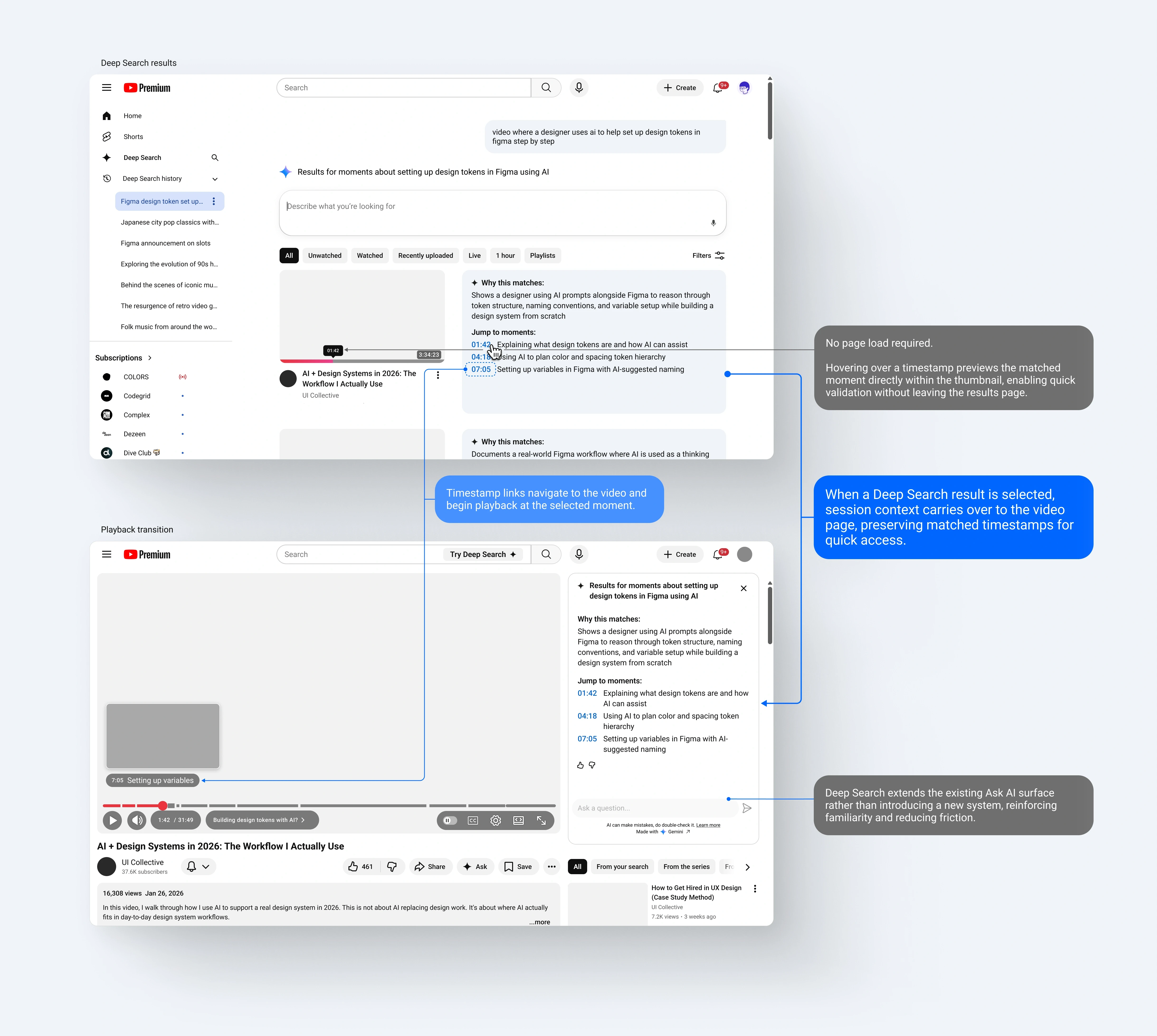
Search-to-Playback Continuity

Deep Search identifies relevant moments within videos and links directly to the exact timestamps.

Search-to-Playback Continuity

Deep Search identifies relevant moments within videos and links directly to the exact timestamps.

1

Moment-based results

Deep Search identifies relevant moments within videos and links directly to the exact timestamps.

1

Moment-based results

Deep Search identifies relevant moments within videos and links directly to the exact timestamps.

2

Intelligent navigation

Selecting a timestamp opens the video and begins playback at the selected moment.

2

Intelligent navigation

Selecting a timestamp opens the video and begins playback at the selected moment.

3

Context persistence

The Deep Search session remains active on the video page, preserving:

• Matched timestamps

• Ongoing Ask AI interaction

• AI reasoning ("Why this matches")

3

Context persistence

The Deep Search session remains active on the video page, preserving:

• Matched timestamps

• Ongoing Ask AI interaction

• AI reasoning ("Why this matches")

4

Integrated surface

Deep Search extends the existing Ask AI interface rather than introducing a separate system, reinforcing familiarity and reducing cognitive load.

4

Integrated surface

Deep Search extends the existing Ask AI interface rather than introducing a separate system, reinforcing familiarity and reducing cognitive load.

This continuity reduces cognitive reset and transforms search from a destination into an ongoing conversation.

This continuity reduces cognitive reset and transforms search from a destination into an ongoing conversation.

This continuity reduces cognitive reset and transforms search from a destination into an ongoing conversation.

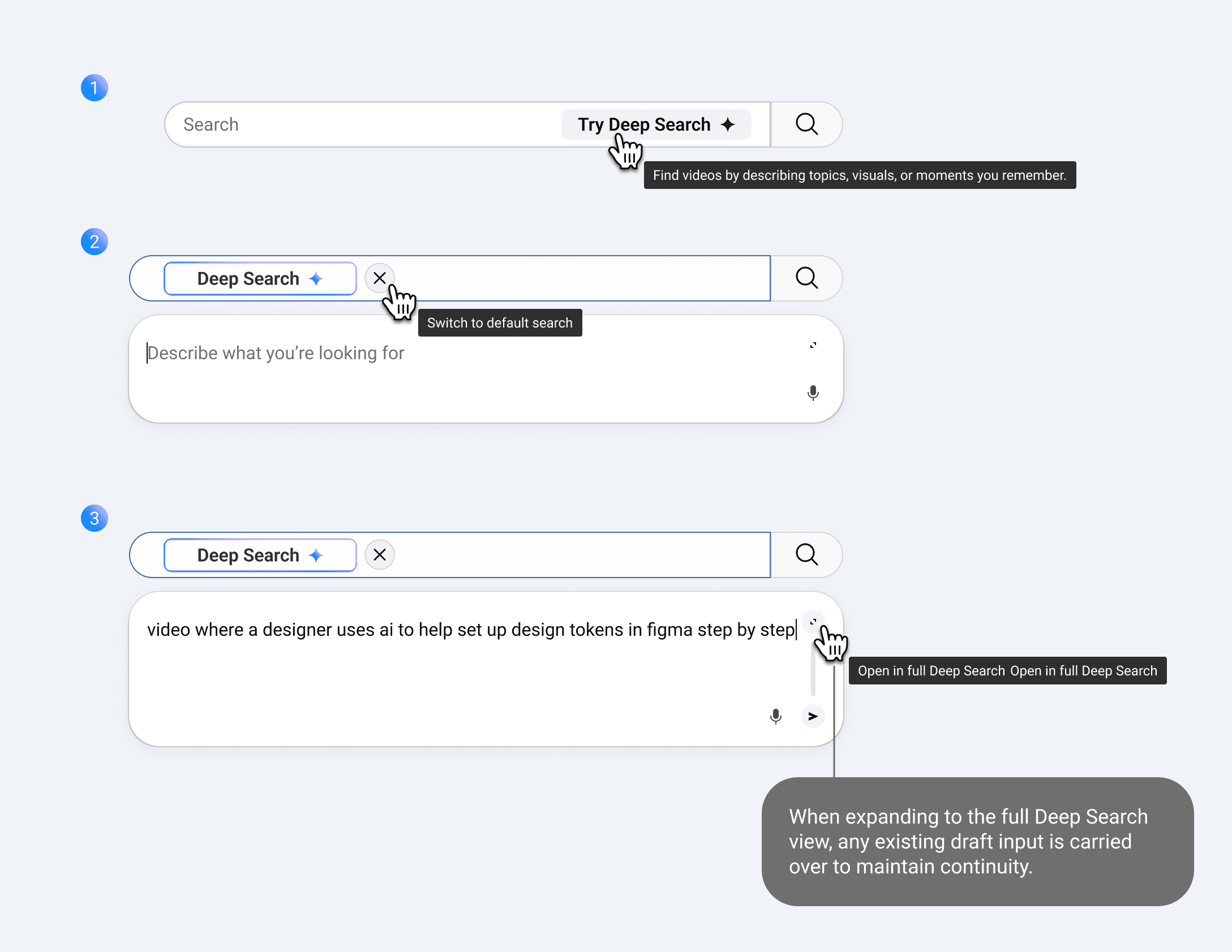
New User Experience

Early interactions emphasize guidance, with instructional copy and visual cues supporting initial exploration.

New User Experience

Early interactions emphasize guidance, with instructional copy and visual cues supporting initial exploration.

Search

Try Deep Search

Find videos by describing topics, visuals, or moments you remember.

1

Deep Search

Describe what you’re looking for

Switch to default search

2

Deep Search

video where a designer uses ai to help set up design tokens in figma step by step

Open in full Deep Search

Open in full Deep Search

When expanding to the full Deep Search view, any existing draft input is carried over to maintain continuity.

3

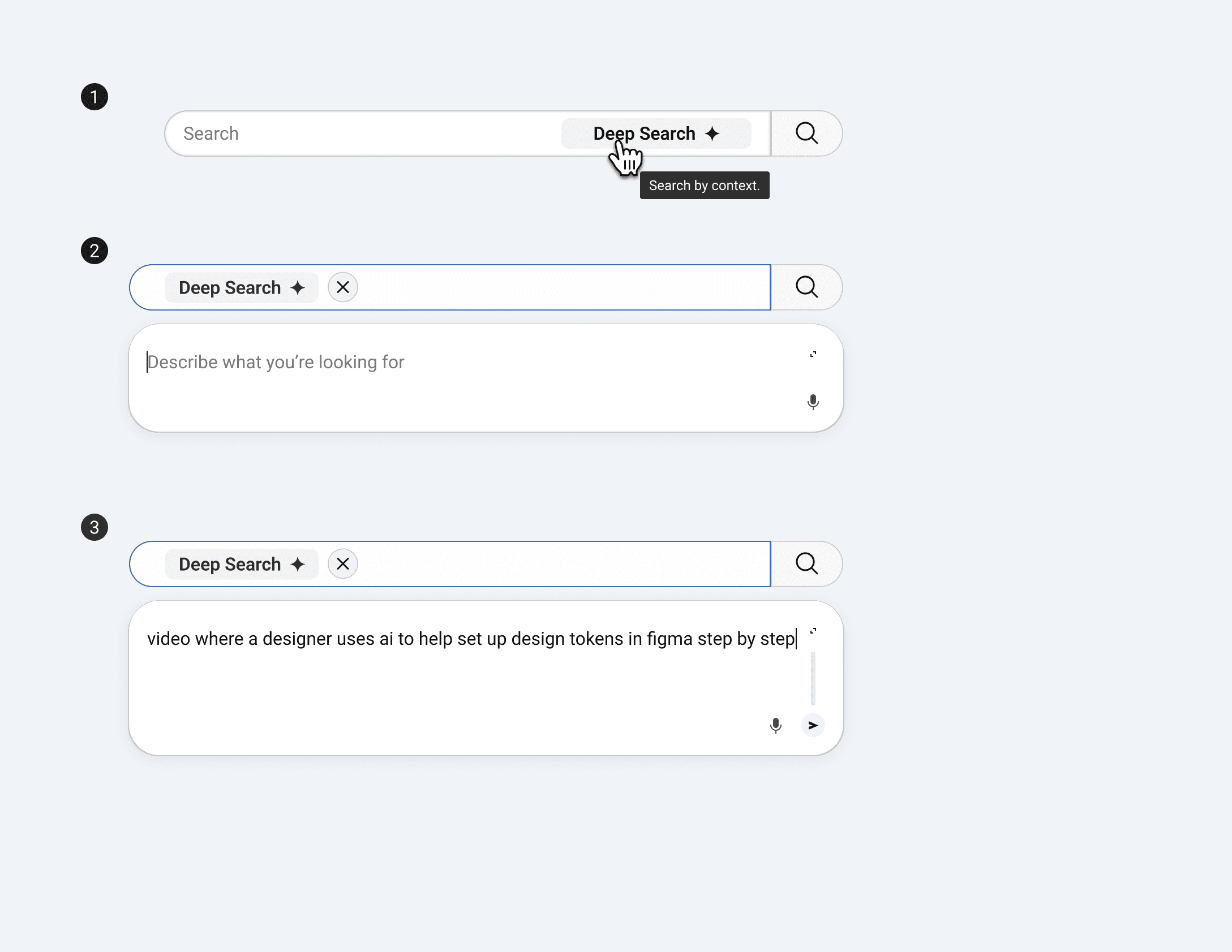
Established User Experience

After repeated use, the interface adopts a more restrained presentation, prioritizing familiarity and speed over instruction.

Established User Experience

After repeated use, the interface adopts a more restrained presentation, prioritizing familiarity and speed over instruction.

Search

Deep Search

Search by context

1

Deep Search

Describe what you’re looking for

2

Deep Search

video where a designer uses ai to help set up design tokens in figma step by step

3